Friday, July 31, 2009

0 Windwos 8 Concept Video

Windwos 8 is the next generation Operating system by Microsoft to give the PC users ultimate computer experience.Although Windows 7 isn’t released until 22nd October 2009, attention is already turning to it’s replacement Windows 8 which will is expected in 2011/12Microsoft has changed its approach to naming operating systems (e.g XP, Vista) and is using an internal numbering system and the next Windows operating system, Windows 7, is the 7th release. Hence the replacement for Windows 7 is expected to be called Windows 8.
Here is one exclusive video of windows 8.This is not actual video of the OS.This is a concept video.But i am sure you can love it.
Read More..

Monday, June 8, 2009

0 Submit Blogger Sitemap To Yahoo To Index Your Web Pages

This post explains how to submit your blogger site-map to Yahoo.By submitting your site-map to yahoo, they will index your web pages in yahoo search engine and provide you with detailed information related to your blog like which pages are linking to yours,popular pages in your site and you can submit and track feeds for your sites.
Also,you have the choice to delete any URL of your blog if you won't want to index certain pages of your site.
Submitting your site to yahoo is easy and give your web pages more exposure.
All you need is a YAHOO ACCOUNT(ID).However,you don't need an yahoo ID to know the information like how many pages are indexed,etc.But,if your blog is a new one or no pages in your blog are indexed(type your blog URL in yahoo search and see to check whether your web pages are indexed or not), then you want Yahoo id to submit your sites,feeds,etc.
Let's see how to make yahoo index your web pages by submitting your blog site-map.
1.Go to Yahoo Site Explorer


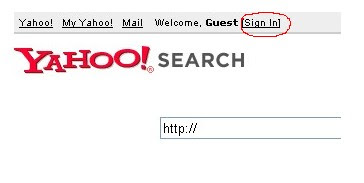
2.Click on the 'Sign in' link which is at the top of the page,see the screen shot below(If you don't have a Yahoo id, you can get one here) and sign into your account.


click on the 'sign in link'
3.Type your blog url in the box provided as shown in the below screen shot.Don't forget to replace the 'yourblogurl' with the original url of your blog and click on the 'Add My Site'

4.After adding your site,you need to Authenticate(Verify your ownership).
There are two ways to verify your ownership.One is to upload a file to the root directory of your site which can't be possible in blogger.

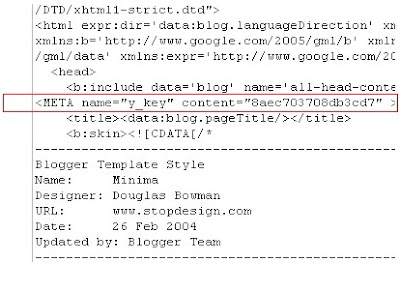
Another one is to 'adding a metatag' which is possible and the only way to verify ownership for bloggers.First,copy the metatag..
Next,sign in to your blogger account>Edit html and paste the metatag below the head tag and SAVE THE CHANGES,look at the screenshot below.

Next,you will get a message saying that 'Your site is pending authentication'
Note:Don't remove the meta-tag,they will re-validate your ownership by checking your ownership regularly.
5.Next,go back to the 'Site explorer home', and check the box next to your blog url and click on the Manage button.


6.Type rss.xml or atom.xml in the box provided.It helps yahoo to discover more of your site content via your rss or atom feeds and to index your blog pages quickly whenever your blog is updated.Next,click on the add feed button.


That's it.Now,you have successfully submitted your blog site-map to yahoo.Check your account after a couple of days and you will see your blog indexed in yahoo search engine.


Read More..

2 Top 5 Ways to get Free One Way Backlinks to your site

One way backlinks are very critical to any website success. The more one way backlinks pointing to your site, the more your Google Pagerank and the more amount of traffic you will get. This should also increase your sales,etc.
But the thing is.. getting the right and quality one way backlinks from high pagerank sites is not an easy task, and in this article, we'll find out some of the best ways to get free one way backlinks:

1. Try to write as much quality content as you can... that will encourage the readers to link to your site. The more useful, informative content you post, the more likely people are to link it. But, this method can take a while to really pay off because like all the new websites, you don't get much traffic.

2. Write quality articles and submit them to top article directories like ezinearticles and goarticles. The advantage in this is, you'll not only get a backlink from high pagerank directories, but also you'll find that your articles are used on other people's sites with a backlink to your site.

3. Participate in forums,discussion boards that are related to your website's niche and add a link to your site in the signature. Make sure that you write quality posts, don't spam. This will also help you get some decent traffic to your site.

4. There is absolutely nothing wrong to get a backlink from a related blog post you decide to comment on. This is one of the effective way of one way link building especially if you comment often on blogs. Comment on blogs related to your niche with a link back to your site as your signature.. and Again, make sure you never spam.

5. Submit your site link to major, well known web directories. Getting listed in directories related to your site not only bring you tons of targetted traffic, but will also improve your search engine rankings. Some of the popular directories to get listed in are DMOZ directory and Yahoo directory. You can submit your link to both paid and free directories and they worth your time.
Read More..

0 Hide-Disable-Remove-Blogger Navbar From Your Blog

Learn how to hide,disable or remove the blogger navbar(navigation bar) from your blog.
First,let us see what blogger navbar is:


blogger navbar

Blogger navbar allows users to easily navigate to other random blogs and it also has a feauture to search the blogs ,and mark any blog as spam.
So,now you have a clear idea of what really a blogger navbar is.So, why so many people prefer to just remove the navbar inspite of the feautures it has like search,etc.Many people think that, it spoils the look of the blog,especially if your blog has differnet subtitle layout which looks too obvious to see for a visitor.Well, let me come to the actual point on how to disable or hide your blogger navbar.

Below is the step-by-step procedure on how to do it with photos to make it easy to understand.

1.Sign in to your blogger account and click the layout button next to your blog name

click the layout button

2.Next,click the edit html tab as shown in the below picture.


edit html

3.Add the below html code as specified in the below picture.
#navbar {
height: 0px;
visibility: hidden;
display: none;
}


add the code like this

4. Save the changes.

Now, you can see your blog without that navbar(this tip can only hides the navbar,it doesn't completely delete it).If you want the navbar to appear again,just remove that code and save the changes.
If you have any doubts,regarding this post,don't hesitate to ask.You can ask your doubts via comments to this post.
Read More..

0 How to disable right click in blogger (blogspot) or any webpage

This post explains how to disable right click on blogger(blogspot) or any other webpage using a html(javascript) code.
It is so annoying if someone copies(thefts) your blog posts,articles,images and another kind of information owned by you saying that they are the original owners of the content.
But,I think 'disabling right click' is not the right solution for that.
Most people come to your site to read information and very small percentage of people come to your site to steal your work,images,etc.So,most people feel it insulting and I think it's very unprofessional thing to do

If you want to protect your images,my suggestion is to add a Watermark(logo) of your sitename,or your name on the images,pictures,etc.
Note:Using this javascript code,you only disable the right click by warning the visitors that the content is copyrighted.

That's all my personal opinion,However if you despirately want to add this feauture,You can get this code here.


Where to paste it in blogger ?
Sign in to your blogger dashboad>layout>Add a Pageelement>html/javascript(look at the screenshot below)
and paste the below javascript code and Save the changes.


How it works?
If you right click on the webpage,a message will pop up on screen saying "function disabled".If you want to change the message to you own one like "sorry....the work is copyrighted" or something like that,replace the "funtion disabled" text with your own message in the Javascript code.
Read More..
Related Posts with Thumbnails